

How to Use Telehealth: A Step-by-Step Guide for Patients
How to Use Telehealth: A Step-by-Step Guide for Patients

Telehealth has moved from a niche convenience to a mainstream healthcare option, yet many patients still feel uncertain about how to start. The process can seem daunting if you are unfamiliar with digital appointments. This comprehensive guide will walk you through everything you need to know, from preparing for your first virtual visit to troubleshooting common technical issues. By understanding how to use telehealth effectively, you can unlock a more convenient, accessible, and often more affordable way to manage your health from the comfort of your home.
Understanding Telehealth and Its Core Formats
Before diving into the logistics, it is important to understand what telehealth encompasses. At its core, telehealth is the use of digital information and communication technologies to access health care services remotely. This broad term covers several distinct formats, each suited for different needs. The most common is synchronous video visits, which are real-time, face-to-face appointments with a provider via a smartphone, tablet, or computer. This format is ideal for consultations, follow-ups, and discussing symptoms where visual cues are helpful.
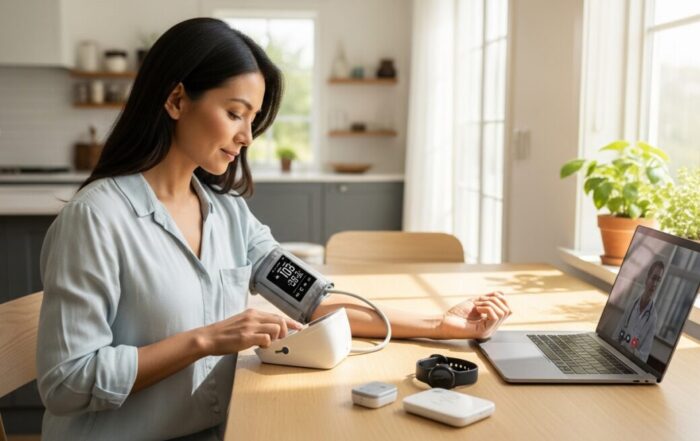
Another key format is asynchronous communication, often called “store-and-forward.” Here, you securely send information (photos, messages, lab results) to your provider, who reviews it and responds later. This is exceptionally useful for dermatology concerns, medication refill requests, or non-urgent questions. Remote patient monitoring (RPM) involves using connected devices at home (like blood pressure cuffs or glucose meters) that automatically send data to your care team. Finally, telephone visits remain a valid and accessible form of telehealth, especially for patients with limited broadband access. Knowing which format your appointment will use is the first step in preparing correctly.
Preparing for Your First Telehealth Visit
Successful telehealth visits require a small amount of preparation. Start by confirming the details with your provider’s office. Will the visit be via a specific app, a secure website link, or a phone call? Ensure you have the correct software installed and an account set up if needed. Test your technology beforehand. Check your device’s camera, microphone, and speaker. A strong internet connection is crucial for video calls, consider connecting to Wi-Fi instead of using cellular data. Choose a quiet, private, and well-lit location for your call. Position a light source in front of you, not behind you, so your face is clearly visible.
Just like an in-person visit, come prepared with relevant information. Have a list of your current medications, including dosages, ready. Write down your symptoms, including when they started, their severity, and any factors that make them better or worse. Note any questions you want to ask the doctor. If you have a home medical device like a thermometer or blood pressure monitor, keep it nearby. Also, have your insurance card and a form of payment on hand, just in case. Following these steps ensures you are organized and can make the most of your limited appointment time.
To streamline your preparation, focus on these five key areas:
- Technology: Device (phone/tablet/computer), stable internet, charged battery, required app installed and tested.
- Environment: Private, quiet room with good lighting and a neutral background.
- Medical Information: Current medication list, symptom notes, recent vitals if applicable, pharmacy name and address.
- Logistics: Insurance card, payment method, appointment link or phone number, patient portal login.
- Questions: A written list of concerns and goals for the visit to stay on track.
The Step-by-Step Process of a Typical Video Visit
On the day of your appointment, log in to the platform or app a few minutes early. This allows time to solve any last-minute technical glitches. You will likely enter a virtual “waiting room” until your provider joins the call. When the visit begins, treat it with the same formality as an in-person appointment. Speak clearly, maintain eye contact by looking at the camera, and minimize distractions. The provider will guide the conversation, but your preparation will help it flow smoothly. Be ready to describe your symptoms in detail. For certain examinations, the provider may ask you to assist, for example, by pressing on an area to check for pain, using a flashlight to show your throat, or moving a joint to assess mobility.
During the visit, do not hesitate to ask for clarification if you do not understand a term or a recommended next step. Before the visit ends, ensure you understand the diagnosis, treatment plan, and any prescribed medications. Confirm how you will receive prescriptions (e-mailed to your pharmacy, for example) and any follow-up instructions. Ask how you will receive visit notes or summaries, and clarify the best way to contact the office with subsequent questions (often through a secure messaging portal). Finally, understand the protocol for urgent concerns that arise after the visit. A clear closing ensures continuity of care and prevents confusion.
Maximizing Telehealth for Chronic Condition Management
Telehealth is a powerful tool for managing ongoing health conditions like diabetes, hypertension, or heart disease. Regular virtual check-ins can improve medication adherence and allow for more frequent monitoring without the burden of travel. For chronic disease management, the integration of remote patient monitoring (RPM) devices is a game-changer. These devices automatically upload data like blood glucose levels, blood pressure readings, or weight to a portal your care team monitors. This creates a more complete picture of your health between visits and can lead to faster interventions.
To use telehealth effectively for chronic care, establish a routine. Schedule regular virtual appointments as recommended by your provider. Consistently use your connected devices as instructed and know how to interpret the basic trends in your data. Use secure messaging to ask questions about minor symptom changes or medication side effects promptly, rather than waiting for the next appointment. This proactive, continuous engagement model empowers you to be an active participant in your own health management and can lead to better long-term outcomes and fewer acute complications.
Navigating Insurance, Costs, and Privacy
Understanding the financial and privacy aspects of telehealth is critical. Insurance coverage for telehealth has expanded significantly, but policies vary. Before your visit, check with your insurance provider to understand your benefits, including any copays or deductibles that apply to virtual visits. Many states have parity laws requiring insurers to cover telehealth similarly to in-person care, but it is always best to verify. For those without insurance or with high deductibles, many telehealth platforms offer flat-rate, cash-pay visits that are often transparent and affordable.
Privacy and security are paramount. Reputable telehealth providers use platforms that are HIPAA-compliant, meaning they have safeguards to protect your health information during transmission. Avoid using public Wi-Fi for telehealth visits if possible. Use a private network and ensure no one can overhear your conversation. Be wary of platforms that do not require a secure login or that use non-encrypted video chat software meant for social use. Your provider’s office should direct you to a vetted, secure solution. Protecting your privacy is a shared responsibility between you and your healthcare organization.
Frequently Asked Questions About Telehealth
Can I get a prescription through a telehealth visit?
Yes, providers can prescribe medications during telehealth visits. However, they are subject to the same clinical standards as in-person care. Controlled substances often have stricter regulations, and providers may not prescribe them without an established relationship or prior in-person evaluation, depending on state law.
What if I have a technical problem during the visit?
First, try restarting your device or app. If the video fails, the provider will often call you on the phone to continue the visit. Always have the clinic’s phone number handy as a backup. Most platforms also have help desks for technical support.
Is telehealth as effective as in-person care?
For many use cases, such as routine follow-ups, mental health therapy, dermatology consultations, and chronic disease management, studies show telehealth is just as effective as in-person care in terms of patient outcomes and satisfaction. It is not suitable for emergencies or conditions requiring a hands-on physical exam.
Can I use telehealth for specialist care?
Absolutely. Many specialists, including psychiatrists, endocrinologists, neurologists, and dermatologists, offer telehealth visits. It is an excellent way to access specialist expertise without traveling long distances.
What equipment do I need for a basic telehealth visit?
At a minimum, you need a smartphone, tablet, or computer with a camera, microphone, speaker, and a reliable internet connection. For certain types of visits, a digital thermometer, blood pressure cuff, or scale may be recommended.
Mastering how to use telehealth is an investment in your healthcare autonomy. It removes traditional barriers like distance, transportation, and time, creating a more flexible and patient-centered model. By following this guide, you can approach your virtual appointments with confidence, ensuring you receive high-quality care while enjoying the convenience of connecting with your provider from anywhere. As digital health continues to evolve, being a prepared and informed patient will allow you to fully leverage its benefits for your long-term well-being.
About the Author: Olivia Bennett




Sign up for our newsletter and Save 20% on Test Kits
"*" indicates required fields