

A Step-by-Step Guide to Accessing Telehealth Services
A Step-by-Step Guide to Accessing Telehealth Services

Telehealth has transformed from a niche convenience into a mainstream pillar of modern healthcare, offering a practical way to consult with doctors, manage chronic conditions, and receive urgent care from home. Yet, for many, the process of how to access telehealth can feel confusing, filled with questions about technology, insurance, and finding the right provider. This comprehensive guide breaks down the entire process into clear, actionable steps, empowering you to confidently connect with care.
Understanding Your Telehealth Options
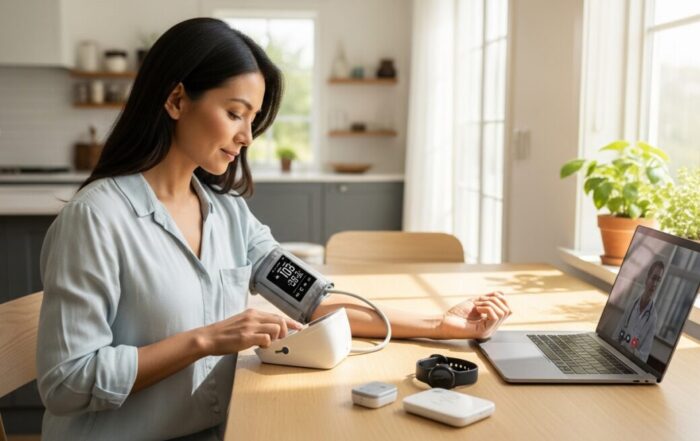
Before you schedule your first virtual visit, it’s helpful to understand the landscape. Telehealth is not a one-size-fits-all service. It encompasses several modalities, each suited for different needs. The most common is live video conferencing, which replicates a traditional office visit in real-time via your smartphone, tablet, or computer. This is ideal for consultations, discussing symptoms, and getting prescriptions. Another option is asynchronous telehealth, often called “store-and-forward.” Here, you securely send medical information (like photos of a rash, lab results, or a detailed message) to a provider who reviews it and responds within a business day or two. This is excellent for non-urgent follow-ups or dermatology concerns. Finally, remote patient monitoring involves using connected devices (like blood pressure cuffs or glucose meters) that transmit data to your care team, a crucial tool for managing chronic diseases like hypertension or diabetes.
Services are typically offered through a few primary channels. Many traditional hospitals and private medical practices now offer telehealth directly to their existing patients through their patient portal. This is often the most integrated option for continuity of care. Alternatively, dedicated telehealth platforms and apps connect you with a network of licensed providers for on-demand or scheduled care. These are fantastic for urgent needs, specialist opinions, or if you don’t have a regular doctor. Furthermore, many health insurance companies provide a telehealth benefit through a specific partner app or website as a perk of your plan. Understanding these options is the first step in determining the best path for you to access telehealth.
Preparing for Your First Virtual Visit
Successful telehealth visits require a small amount of preparation to ensure a smooth experience. The foundation is technology. You will need a reliable internet connection and a device with a camera, microphone, and speaker. A smartphone or tablet is most common, but a laptop or desktop computer works perfectly. Before your appointment, test your equipment. Ensure your device is charged, your webcam and audio are functioning, and you have a strong Wi-Fi signal. It is highly recommended to download and install any required app or software in advance, not five minutes before your call. Create an account if necessary and familiarize yourself with the basic layout.
Just like an in-person visit, gathering your information is critical. Prepare a list of your current medications, including dosages. Have your pharmacy’s name and address ready. Write down a concise description of your symptoms: when they started, what makes them better or worse, and their severity. If you have a relevant medical history, such as past surgeries or chronic conditions, be ready to discuss it. Also, keep your insurance card and a form of payment nearby. Finally, choose a private, quiet, and well-lit location for your call. Good lighting in front of you (not behind you) helps the provider see you clearly. This preparation minimizes technical glitches and allows you to focus entirely on the medical consultation.
Your Pre-Visit Checklist
To streamline your preparation, use this simple checklist:
- Technology Test: Confirm camera, microphone, speaker, and internet work. Install required apps.
- Medical Information: List medications, symptoms, pharmacy details, and relevant history.
- Documents: Have your insurance card and a payment method accessible.
- Environment: Choose a private, quiet room with good front lighting.
- Device: Ensure your smartphone, tablet, or computer is fully charged or plugged in.
Navigating Insurance and Costs for Telehealth
The financial aspect of telehealth is a major consideration for most patients. Coverage has expanded dramatically, but it is not universal. The first place to check is your health insurance plan’s website or member handbook. Look for terms like “telehealth,” “telemedicine,” or “virtual visits.” Many plans now cover these services similarly to in-person visits, meaning you may only be responsible for your standard copay or coinsurance. Some employers and insurers even offer $0 copay telehealth visits through specific platforms as a cost-saving measure. It is crucial to understand whether your plan requires you to use in-network telehealth providers or a designated platform to receive full benefits. Using an out-of-network service could result in higher out-of-pocket costs or no coverage at all.
If you are uninsured or your insurance does not cover a particular service, telehealth can still be an affordable option. Many direct-to-consumer telehealth apps and platforms offer transparent, flat-rate fees for visits. These fees often range from $40 to $80 for a basic consultation, which can be less than an uninsured rate for an urgent care clinic visit. Some services also offer monthly or annual membership plans for unlimited access to primary care. Always confirm the total cost before finalizing an appointment. Ask if the quoted price includes the provider’s fee only, or if there are additional charges for prescriptions, follow-up messages, or specialist reviews. Being proactive about costs prevents surprise bills and helps you make an informed decision on how to access telehealth care within your budget.
Finding and Choosing a Telehealth Provider
With numerous platforms available, selecting the right one is key to a positive experience. Your choice will largely depend on your specific need. For ongoing, primary care and chronic disease management, seeking a service that offers longitudinal care with the same provider is ideal. This builds a doctor-patient relationship and ensures consistent management. For sudden, non-emergency issues like a sinus infection, rash, or urinary tract infection, an on-demand urgent care platform that connects you with the first available provider is perfectly suitable. For mental health, seek platforms dedicated to therapy and psychiatry that carefully match you with a licensed professional based on your needs.
When evaluating a platform, consider these key factors: licensing (ensure providers are licensed in your state), availability (24/7 vs. business hours), services offered (can they prescribe necessary medications?), and user reviews. If you have a preferred pharmacy, verify the platform can send prescriptions there. For those with complex medical histories, a service that allows you to upload medical records or integrates with your existing health system’s records may provide safer, more coordinated care. Taking the time to research ensures the service aligns with your healthcare goals and provides the quality of care you expect.
What to Expect During and After the Appointment
When your appointment time arrives, log into the platform a few minutes early. The process typically begins in a virtual waiting room. Once the provider joins, they will conduct a visit much like an in-person one, starting with verifying your identity and discussing your symptoms. Be prepared to describe your concern clearly. The provider may ask you to perform simple self-exams, like checking your throat with a flashlight or measuring your heart rate. They will discuss possible diagnoses and a treatment plan. If a prescription is appropriate, they will send it electronically to your chosen pharmacy. The provider should also outline clear instructions for follow-up, specifying when you should seek in-person care if symptoms worsen.
After the visit, you should receive a visit summary, which may include the diagnosis (ICD-10 code), treatment plan, and any prescriptions. File this with your medical records. If you were prescribed medication, contact your pharmacy to confirm receipt and check the pickup time. Adhere strictly to the follow-up plan. Some platforms allow you to send secure messages to your provider with updates or questions. Remember, telehealth has limits. It is not suitable for medical emergencies like chest pain, severe shortness of breath, stroke symptoms, or major trauma. In such cases, call 911 or go to the nearest emergency room immediately.
Frequently Asked Questions
Can I get a prescription through telehealth? Yes, licensed providers can prescribe a wide range of medications during a telehealth visit. However, controlled substances (like certain pain medications or ADHD drugs) are subject to strict federal and state regulations, and many platforms do not prescribe them via telehealth. Always confirm a platform’s prescription policies.
Is telehealth covered by Medicare? Yes, Medicare Part B covers telehealth services broadly, including for mental health. You pay the Part B deductible and 20% coinsurance for most services. During public health emergencies, coverage rules are often expanded. Check Medicare.gov for the most current information.
What if I have a technical problem during the visit? Most platforms have technical support available. Have a phone number handy. If the video fails, the provider may be able to switch to an audio-only phone call, though coverage for phone-only visits varies by insurance.
Can I use telehealth for my child? Absolutely. Many platforms offer pediatric care. The parent or guardian must typically create an account and be present during the visit for patients under 18 (age may vary by state).
Are telehealth diagnoses and treatments as accurate as in-person? For many conditions, yes. Studies show telehealth is effective for a vast array of common acute and chronic conditions. Providers are trained to conduct assessments virtually. However, for issues requiring a physical exam, imaging, or lab work, they will recommend an in-person follow-up.
Accessing telehealth is a straightforward process that demystifies digital healthcare. By understanding your options, preparing your space and information, verifying costs, and choosing a reputable provider, you can unlock a convenient, effective, and often more accessible form of medical care. This model empowers patients to take an active role in their health management from the comfort of home, breaking down traditional barriers to timely medical attention.
About the Author: Anthony Collins




Sign up for our newsletter and Save 20% on Test Kits
"*" indicates required fields